---
title: Set Origin
description: Set Origin is used to synchronize the current stitcher location with all the patterns in all the quilt groups of a project
---
[Skip to content](https://knowledgebase.gammill.com/knowledge/point-of-origin-command#main-content)
English
Show submenu for translations
[More support](https://knowledgebase.gammill.com/knowledge/kb-tickets/new?hsLang=en)

Open main navigation
Close main navigation
- English
Show submenu for translations
- [More support](https://knowledgebase.gammill.com/knowledge/kb-tickets/new)
How can we help you?
- There are no suggestions because the search field is empty.
1. [Help Center](https://knowledgebase.gammill.com/knowledge?hsLang=en)
2. [CreativeStudio](https://knowledgebase.gammill.com/knowledge/creativestudio?hsLang=en)
3. [Stitch Commands](https://knowledgebase.gammill.com/knowledge/creativestudio?hsLang=en#stitch-commands)
# Set Origin
## Set Origin is used to synchronize the current stitcher location with all the patterns in all the quilt groups of a project
### Point of Origin Defined
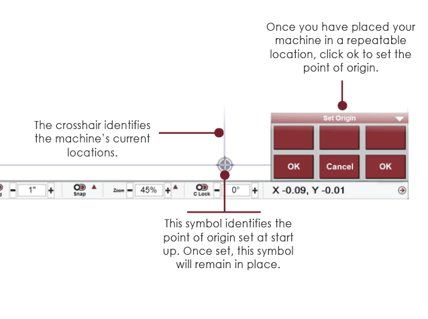
The **Point of Origin** is used to synchronize the current stitcher location with all the patterns in all the quilt groups. This is done automatically upon start-up and, if needed, it can be manually initiated using the **Set Origin** command.
For all pattern placement, the point of origin is the ‘basepoint.” Think of the CAD as a graph with the point of origin as the center with coordinates (0,0). All pattern placement is defined from the center. The point of origin can be anywhere you select but it should be easily repeatable each time you turn on your machine. Generally, quilters pull the machine all the way to the front or push it all the way to the back and move it as far as it will go to one side of the table to use one of the four corners as the point of origin.
### Set Point of Origin on Startup
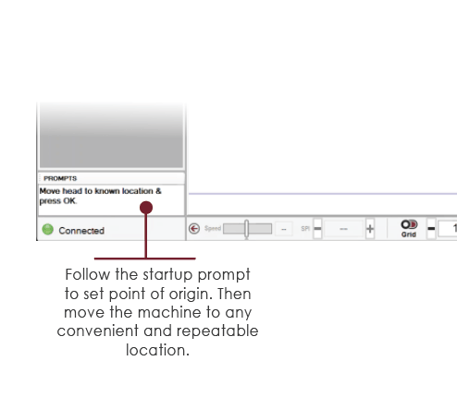
After turning on your Statler and opening CreativeStudio, you are always prompted to set the point of origin.
#### VIDEO | Point of Origin Preview
### Set Origin After Initial Startup
To set the point of origin anytime after the initial startup of CreativeStudio, use the dropdown Stitch Commands menu and select Set Origin. Or use the Set Origin icon on the menustrip.
- [CreativeStudio](https://knowledgebase.gammill.com/knowledge/creativestudio?hsLang=en#main-content)
- [Introduction and Quick Start](https://knowledgebase.gammill.com/knowledge/creativestudio?hsLang=en#introduction-and-quick-start)
- [File, Edit, View Commands](https://knowledgebase.gammill.com/knowledge/creativestudio?hsLang=en#file-edit-view-commands)
- [Pattern Manager](https://knowledgebase.gammill.com/knowledge/creativestudio?hsLang=en#pattern-manager)
- [References](https://knowledgebase.gammill.com/knowledge/creativestudio?hsLang=en#references)
- [Draw Commands](https://knowledgebase.gammill.com/knowledge/creativestudio?hsLang=en#draw-commands)
- [Feature Commands](https://knowledgebase.gammill.com/knowledge/creativestudio?hsLang=en#feature-commands)
- [Pattern Commands](https://knowledgebase.gammill.com/knowledge/creativestudio?hsLang=en#pattern-commands)
- [Stitch Commands](https://knowledgebase.gammill.com/knowledge/creativestudio?hsLang=en#stitch-commands)
- [Help Commands](https://knowledgebase.gammill.com/knowledge/creativestudio?hsLang=en#help-commands)
- [Right-Click Menus](https://knowledgebase.gammill.com/knowledge/creativestudio?hsLang=en#right-click-menus)
- [Service Commands](https://knowledgebase.gammill.com/knowledge/creativestudio?hsLang=en#service-commands)
- [Pattern Manipulation](https://knowledgebase.gammill.com/knowledge/creativestudio?hsLang=en#pattern-manipulation)
- [Troubleshooting](https://knowledgebase.gammill.com/knowledge/creativestudio?hsLang=en#troubleshooting)
- [General Machine Care and Maintenance](https://knowledgebase.gammill.com/knowledge/general-machine-care-and-maintenance?hsLang=en#main-content)
- [Exploring the Table and Loading the Quilt](https://knowledgebase.gammill.com/knowledge/general-machine-care-and-maintenance?hsLang=en#exploring-the-table-and-loading-the-quilt)
- [Thread and Bobbins: Threading, tension, bobbin cases](https://knowledgebase.gammill.com/knowledge/general-machine-care-and-maintenance?hsLang=en#thread-and-bobbins-threading-tension-bobbin-cases)
- [Optional Equipment](https://knowledgebase.gammill.com/knowledge/general-machine-care-and-maintenance?hsLang=en#optional-equipment)
- [The Machine Head: Mechanics, Stitching and Troubleshooting](https://knowledgebase.gammill.com/knowledge/general-machine-care-and-maintenance?hsLang=en#the-machine-head-mechanics-stitching-and-troubleshooting)
- [Regular Maintenance & Care](https://knowledgebase.gammill.com/knowledge/general-machine-care-and-maintenance?hsLang=en#regular-maintenance-care)
- [Hand Guided Machines](https://knowledgebase.gammill.com/knowledge/hand-guided-machines?hsLang=en#main-content)
- [Vision 2.0](https://knowledgebase.gammill.com/knowledge/hand-guided-machines?hsLang=en#vision-2-0)
- [Older Models: Plus, Minus, Vision 1](https://knowledgebase.gammill.com/knowledge/hand-guided-machines?hsLang=en#older-models-plus-minus-vision-1)
- [Elevate](https://knowledgebase.gammill.com/knowledge/elevate?hsLang=en#main-content)
- [Elevate Troubleshooting](https://knowledgebase.gammill.com/knowledge/elevate?hsLang=en#elevate-troubleshooting)
- [Introduction and Software](https://knowledgebase.gammill.com/knowledge/elevate?hsLang=en#introduction-and-software)
- [Quick Start](https://knowledgebase.gammill.com/knowledge/elevate?hsLang=en#quick-start)
- [Elevate Projects](https://knowledgebase.gammill.com/knowledge/elevate?hsLang=en#elevate-projects)
[](http://www.gammill.com)
[mailto:email@email.com](mailto:email@email.com)
Copyright © 2026, Gammill, Inc.